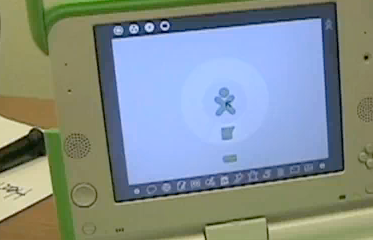
Last holiday season I participated in the Give One, Get One campaign by the folks at One Laptop Per Child (OLPC). This is the famous $100 laptop (that costs $200 right now), conceived by Nicholas Negreponte and designed by the Media Lab at MIT to offer learning experiences for children in developing countries. Through my donation to OLPC, I became the proud owner of a colorful, small XO laptop and felt altruistic because I funded one laptop for a child somewhere.
Until now, I barely used it. While it may be perfect for kids, its tiny keyboard makes it pretty difficult for adults to use - especially adults who have many years of experience with a full-size keyboard.
This summer, however, I took a hardware class at Johnson Bible College taught by Mr. Bob Chambers, the person who had introduced me to OLPC. As part of the hardware class, we had to complete a final project for this class. It could be either a traditional research paper or a project.
I decided that exploring the features of the XO laptop would be my final project. I have researched, recorded, and edited for hours. I am certain that a paper would have been much easier and much less time consuming, but I wouldn't have learned nearly as much.
The operating system for the XO laptop is based on Linux and is called Sugar. Sugar Labs was recently started by Walter Bender. As with other technology, the software entity for the XO is now separate from the hardware. The learning activities and interface are based on the constructivist approach. Sugar (and constructivism) requires learning through doing; its activities focus on learning how to learn, and learning more efficiently and effectively.
One of the really cool things Sugar Labs has done in recent months is to offer the whole operating platform for download onto a 1 GB (or larger) flash drive. Called Sugar on a Stick, most computers can now run the Sugar platform. Mr. Chambers (my hardware teacher) and I had a difficult time getting it to work at first, but finally managed to download it so that it would boot. A couple of hints - make sure your computer is bootable from a USB port and that the USB drive is higher in the boot order than the hard drive. Even though my flash drive was a FAT file system (required for Sugar), I reformatted my flash drive. I don't know if this actually makes a difference, but after the reformat the download finally worked.
It is so much easier (at least for me) to navigate through the Sugar operating system and use its learning activities when I'm using a full size computer. In fact, if this project weren't for a hardware class, and therefore (at least in my opinion) should be focused on hardware, I would have explored the activities for my project. I have used many of them and I find many of them intriguing.
On to hardware...
The XO laptop is rugged. It's plastic case resists water and dust. Almost everything is sealed. OLPC decided that it would have no hard drive because hard drives fail frequently. Instead it has flash memory. Its unique design minimizes energy usage.
It's LCD screen, the brainchild of Mary Lou Jepsen, pivots and can be rotated and laid flat against the body of the laptop so it can be used as a text reader. In computer mode, it has a color display; as a text reader, the display is black and white. It can be read in full sunlight for students who are schooled in outdoor classrooms. A special chip allows the display to be used while the processor is not active. (Ms. Jepsen has founded a company called Pixel Qi to explore the commercial potential for her screen design.)
I cannot do the XO justice so please take a look at the XO hardware and spec sites.
Below is a link to a series of videos showing and demonstrating various features of the XO. I have much more video footage of various Sugar activities, but I needed to try to remain true to my hardware oriented goal. The next two YouTube playlists are of me taking apart and putting the XO back together.
I watched a video of a lady who, in 15 minutes of unedited video, disassembled and reassembled the XO. I so wanted to emulate her. It took me 2 hours. Although I had watched her video twice and read the directions multiple times, I was still fearful. I stopped several times to reread directions and view various portions of the video again. I want to thank this anonymous lady (probably named Andrea) for her expertise.
Once I figured out various techniques it was fairly easy. Also, all the cables were much easier to release after they'd been removed the first time. I have edited out most of the real bloopers and there were quite a few. The major one was not taking out the battery first. All of the warnings in bright red boxes did not stay in my brain. I was and am highly embarrassed.
Putting it back together was pretty easy until the last step. That white plastic screen cover did not want to go on. There is still a slight gap on the side, but I cannot make it close. I have watched the OLPC video and the video of me taking it off, and I cannot figure out where and why it is not fitting right.
If perchance, a major component of the XO fails, new keyboards, touch pads, screens and batteries can be purchased from I Love My XO.
A number of ideas for the measure activity used homemade sensors using the microphone jack. I really wanted to make one or more of these, but did not have the time or the technical expertise to know exactly what I needed to buy. I have my son saving "dead" headphones so I can have the connector and wiring if I ever feel confident enough.
I did, however, come upon a cool video microscope to make at instructables.com. I had the major parts necessary - an old microscope and webcam - so put it together. It works; however, not with an XO laptop. I tried every software and hardware trick I could think of, but finally found a website that said the internal webcam of the XO can't be overridden by an external one at this time. Someday I may take the time to put the video together of that adventure.
Finally, I need to thank several people. Mr. Bob Chambers gave me the confidence to attempt the deconstruction and reconstruction of the laptop. Ms. Samantha Hernandez faithfully taped me and admirably refrained from trying to take over when my clumsy attempts at working with hardware failed. Mr. Galen Smith assisted with my YouTube endeavors (it is dreadfully boring to upload video) and getting the videos linked efficiently to this blog.
I have included a bibliography of the various sites visited when researching this project. I would suggest that everyone start with the OLPC wiki. It has an amazing breadth and depth of information, though I discovered that it seems that sometimes articles about topics aren't fully realized.
Now if you have time, take a look at the videos...




 Posts
Posts